DBS checks:

3.Request a DBS check

On this page:

    Introduction

    You can request a DBS check if you are a manager:

    • who is recruiting to a role that needs a DBS check, and have checked that the preferred candidate does not already hold a valid certificate
    • of a staff member whose DBS check certificate is about to expire, and they are not registered with the update service.

    Please note:
    You can not create a DBS check for yourself. You must ask your line manager to do this on your behalf.

    Types of DBS check

    There are four types of DBS check, and each type results in a DBS certificate being issued.

    Start a DBS check

    To start a DBS check follow the steps below.

    1
    Open DBS online

    Use the button below to open the application. Then login using your unique username and password.

    2
    Start application

    3
    Job description

    4
    Organisation

    5
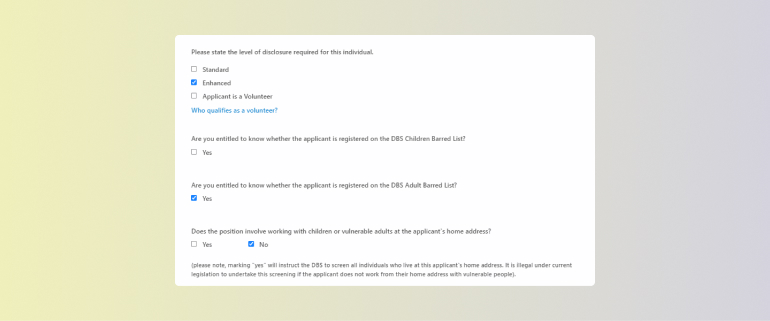
    DBS check requirements

    7
    Applicant name

    8
    Username and password

    9
    Email address

    10
    Payment

    11
    Submit the form

    12
    What happens next

    Not got an account? Find out how to request one.

    Please note:
    All applications must now be made online via DBS online. This is the most efficient method for us to process DBS forms. Paper forms are no longer accepted.

    DBS online main menu

    Select Add DBS Application from the menu.

    DBS online job description field

    From the Job description dropdown, select the job description that applies to the job role.

    Make sure you select the correct check

    If you do not select the right level of check for the role:

    • you will have to repeat the DBS check process and submit a new form at extra expense
    • this will cause a delay to the recruitment process
    • it may allow someone who is not suitable to work with children or vulnerable adults to work at the council.

    If you are unsure of the level of check required, or you are unable to find the right job description in the list, you can:

    DBS online organisation name field

    In the Organisation name field, type East Riding of Yorkshire Council.

    DBS online check requirements questions

    The following questions will then be pre-populated based on the job description you have chosen.

    6
    Update service

    DBS online update service options

    If the applicant does not need to use the update service, select Subscription not required.

    If the update service is needed, select Applicant subscribes - CBS undertakes annual check.

    Please note:
    We do not recommend using the more regular update subscriptions.

    DBS online applicant’s surname field

    Type the last name of your team member (or the preferred candidate) in the Applicant’s surname field.

    DBS online applicant’s forenames field

    Type the first name of your team member (or the preferred candidate) in the Applicant’s forenames field.

    Please note:
    Only add 1 name to the Applicant’s forename field, unless the first name is double-barrelled. Your team member (or the preferred candidate) will be able to add their middle name(s), if relevant, on their part of the form.

    DBS online unique username field

    Type a username in the Create unique username field. This should be created as follows:

    [Surname] + [today’s date] + [YOUR INITIALS]

    So it would look similar to this:

    Bloggs250422MB

    The Password field will then be auto-populated with a unique password.

    DBS online applicant’s email field

    In the Applicant’s email address field, type the email address you have for your team member (or the preferred candidate). If they have a council email address, you can use this.

    DBS online cost/detail code field

    In the Cost/Detail Code field enter your service area cost and detail code.

    Please note:
    The DBS check and admin fees must be paid for by the service area requesting the check. The cost of this depends on the type of check. Find out more about costs below.

    DBS online create application button

    To submit the form select Create application.

    Once you have submitted the form, your team member (or the preferred candidate) will receive an email. This will include their username and password.

    You must now ask them to:

    Team member (or the preferred candidate) unable to complete the form?
    If your team member (or the preferred candidate) is unable to access the form, or is having issues completing it, you can complete it on their behalf.

    DBS check and admin costs

    DBS check

    • Basic £18
    • Standard £18
    • Enhanced £38

    Admin fees per check

    • New application (basic) £13
    • New application (standard or enhanced) £3

    This check is suitable for people working with children or adults in a regulated activity, such as providing healthcare or personal care.

    The certificate will contain the same information as an Enhanced DBS certificate, but will include a check of the vulnerable adults and/or children’s barred list.

    Barred lists

    A barred list is a list of people who have been barred from working with vulnerable adults or children.

    It is an offence to employ a barred person in a role that involves working in regulated activity with vulnerable adults and/or children.

    Please note:

    Barred list information must not be requested on any person who is not engaging in, or seeking to engage in, regulated activity. It is unlawful to carry out a check for someone who does not meet the relevant criteria.

    Basic DBS check

    This check is for any purpose, including employment.

    The certificate will contain details of convictions and conditional cautions that are considered to be unspent under the terms of the Rehabilitation of Offenders Act (ROA) 1974.

    Standard DBS check

    This check is suitable for certain roles, such as a security guard.

    The certificate will contain details of both spent and unspent convictions, cautions, reprimands and warnings that are held on the Police National Computer, which are not subject to filtering.

    Enhanced DBS check

    This is suitable for people who work with children or adults in certain circumstances, such as those in receipt of healthcare or personal care.

    The certificate will contain the same details as a standard certificate and may also contain non-conviction information supplied by relevant police forces, if it is deemed relevant and ought to be contained in the certificate.

    Employee confidential helpline

    0330 380 0658

    Speak to fully qualified counsellors and support specialists at any time, 365 days a year.

    Use code 107574 to access the online resources.

    More about the employee assistance programme

    Loading news articles...
    Search the phonebook
    Search by first or last name, extension number, service name such as 'council tax' or venue such as 'Bridlington library'

    Alerts